



Will Google built-in in the 2026 Mazda CX-5 work without a data plan in Milwaukee, WI?
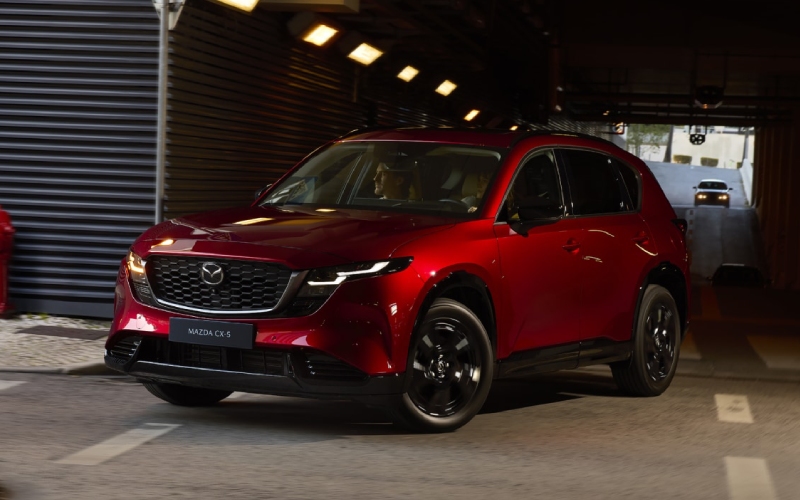
Russ Darrow Mazda of Milwaukee – Will Google built-in in the 2026 Mazda CX-5 work without a data plan in Milwaukee, WI?
Modern SUV shoppers around Milwaukee want clarity on one simple, real-world question: what happens to the 2026 Mazda CX-5’s Google built-in experience if you do not use a phone hotspot or in-vehicle data plan? At Russ Darrow Mazda of Milwaukee, we set up this technology for drivers every day, so we put together a clear, local guide to what works offline, what needs an internet connection, and how to prep your CX-5 for seamless drives across the I-94/41 corridor, the East Side, the Historic Third Ward, and beyond.
What “Google built-in” means in the 2026 Mazda CX-5
The all-new 2026 Mazda CX-5 introduces an available 15.6-inch integrated touchscreen, the largest ever offered on a Mazda, with Google built-in1. In practical terms, that means your SUV can run select Google apps and services directly on the vehicle’s system, including Google Maps and access to the Google Play Store for compatible in-vehicle apps. When signed in, you can also see saved places and recent searches, so navigating to spots like American Family Field, Fiserv Forum, or Mitchell International Airport is as familiar as it is on your phone.
Google built-in in the CX-5 is designed for intuitive, smartphone-like usability. It supports a customizable home screen for quick access to your most-used features. Google Gemini, an AI assistant from Google, is coming soon to cars with Google built-in and will make hands-free control even more natural — helpful when you want to find coffee on Brady Street or toggle settings without taking your eyes off the road.
Driving without a phone or data plan: what still works
You can enjoy many core functions of the 2026 Mazda CX-5’s system even when you are not connected to cellular data or a phone hotspot. Think of this as “plan ahead, then drive worry-free.” If you download what you need on Wi-Fi before heading out, you will have reliable navigation and entertainment for your daily Milwaukee routine.
- Google Maps Offline Navigation: Download map areas for Southeastern Wisconsin at home or on dealership Wi-Fi, and you can navigate turn-by-turn without a data connection.
- Saved Places and Routes: Locations like the Milwaukee Art Museum, Lakefront Brewery, Bayshore, or favorite daycare pickup can be available offline once synced.
- Media You Download: Select compatible apps allow offline playback after you download podcasts, audiobooks, or playlists over Wi-Fi.
- Bluetooth Calls and Audio: Pair your phone over Bluetooth to place calls or stream audio, even if your phone’s cellular data is off.
- Core Vehicle Functions: Settings, climate, the CX-5’s drive characteristics, and systems like i-Activ AWD remain fully functional regardless of connectivity.
There are, however, features that depend on a live connection. Knowing which ones need data helps you decide when to connect — and when you can skip it.
- Real-Time Traffic and Rerouting: Live congestion data and incident alerts on I-43, I-94/41, or the Hoan Bridge require an internet connection.
- Voice Queries and Smart Suggestions: Cloud-based voice requests, search results, and browseable nearby places work best online.
- App Downloads and Updates: Installing new apps from Google Play and keeping them current needs Wi-Fi or cellular data.
- Account Sync Across Devices: New favorites or changes made on your phone sync to the vehicle profile only when connected.
- Future AI Features: Google Gemini capabilities, when available in-vehicle, will require an internet connection for full functionality.
Simple connectivity setups Milwaukee owners actually use
We see three easy approaches that fit most daily routines around Milwaukee, Shorewood, Wauwatosa, and Mequon. Choose the one that matches how you drive and when you want live information versus offline stability.
- Wi-Fi-First Prep: Use home or dealership Wi-Fi to download offline maps, apps, and media before your commute. You get smooth navigation and entertainment without using mobile data.
- Phone Hotspot On-Demand: Turn your phone’s hotspot on only when you want live traffic or to search for last-minute dinner spots in the Third Ward, then switch it off again.
- In-Vehicle Data Plan (If Equipped): Some owners prefer a dedicated vehicle connection for always-on convenience. Ask our team about availability and setup support.
If you are new to Google built-in, a quick 10-minute session on our showroom Wi-Fi is often all it takes to download your core apps, sign in, and cache an offline map of Southeastern Wisconsin — then you are set for regular drives without babysitting your data usage.
How to prep your CX-5 for a smooth, phone-free drive day
Want reliable navigation and entertainment even if you leave your phone in your bag? Do these once, and you will be covered for commutes, lakefront outings, and weekend errands to Metro Market or Costco.
- Connect to Wi-Fi: At home or at our showroom, connect the CX-5 to a trusted network from the touchscreen settings.
- Sign in to Google: Use your Google Account so Maps can access your saved places and recent searches.
- Download Offline Maps: In Google Maps, open your profile, choose Offline Maps, and download the Milwaukee metro area plus any frequent routes west toward Brookfield and Waukesha.
- Install Key Apps: From Google Play, add compatible podcast, audiobook, or music apps you use — then download episodes and playlists for offline playback.
- Pin Favorites: Save destinations like work, school, your gym, and go-to restaurants so they are easy to select without searching.
That is it. With those steps, your 2026 Mazda CX-5 delivers dependable navigation and entertainment, whether you are cruising along Lincoln Memorial Drive or easing through construction near the Marquette Interchange.
Beyond connectivity: everyday ease baked into CX-5
Technology is only part of what makes the 2026 Mazda CX-5 such a natural fit for Milwaukee. The cabin is newly rethought for comfort, with larger door openings for easier entry and car seat loading, plus noticeably more rear leg, knee, and headroom. The cargo area is longer, higher, and features a lower lift-in height compared to the previous generation — helpful when you are loading a jogging stroller, a week’s groceries, or gear for a Grant Park picnic.
On the move, the 2.5-liter SkyActiv-G four-cylinder pairs with a 6-speed automatic that has been recalibrated for sharper response when you need it and a more relaxed, quiet demeanor when you are cruising. That balance keeps city errands calm and highway stretches up to Mequon or down to Oak Creek pleasantly composed. And with Mazda’s commitment to safety and a robust suite of standard and available driver-assistance technologies, the CX-5 is engineered to help you stay confidently in control.
The end result is an SUV that feels thoughtfully made for how we really drive here — nimble downtown, comfortable on longer routes, and refreshingly intuitive to live with Monday through Sunday.
Visit Russ Darrow Mazda of Milwaukee for setup and a test drive
If you want to see Google built-in running on the CX-5’s available 15.6-inch display — online and offline — stop by Russ Darrow Mazda of Milwaukee at 11330 W Metro Auto Mall. We will walk you through connecting to Wi-Fi, downloading offline maps, signing into your Google Account, and tailoring the home screen to your routine. Prefer to keep data usage light? We will show you exactly how to prep the system so your essentials are ready the moment you start the engine.
Frequently Asked Questions:
Can I use Google Maps in the 2026 Mazda CX-5 if my phone is off?
Yes. After you download offline maps for your driving area on Wi-Fi, Google Maps can provide turn-by-turn guidance without a live data connection. You will not see live traffic or incident alerts offline, but routing still works reliably.
How do I download offline maps on the CX-5 with Google built-in?
Open Google Maps on the vehicle display, tap your profile icon, select Offline Maps, then choose Select Your Own Map. Pan and zoom to include Milwaukee and the surrounding areas you frequent, then download while on Wi-Fi. Maps update best when the vehicle reconnects to Wi-Fi periodically.
Will Google Gemini work without internet in the CX-5?
Google Gemini is coming soon to cars with Google built-in. Its advanced, conversational features are cloud-based and will require an internet connection for full functionality.
Do multiple drivers need separate Google sign-ins?
You can sign in to a Google Account to personalize Maps and compatible apps, and you can sign out at any time. Our team can help you set up the experience that works best for single or household use.
Does using my phone’s hotspot drain the battery quickly?
Hotspots use more power than normal standby. If you plan to keep a hotspot on during longer drives, plug your phone into a charger and consider enabling its low-power settings between sessions.
Ready to experience the 2026 Mazda CX-5 in person? Visit us for a test drive, or contact Russ Darrow Mazda of Milwaukee to schedule a personalized technology walkthrough. We are here to make sure your CX-5 fits your life — online, offline, and everywhere you drive in Milwaukee.
1 Google, Gemini, Google Play and Google Maps are trademarks of Google LLC. Internet connection and compatible operating system required. Availability may vary by device, country, and language.
0 comment(s) so far on Will Google built-in in the 2026 Mazda CX-5 work without a data plan in Milwaukee, WI?